
WebWright WebWright

Built for action,
not just browsing.

An autonomous AI agent that lives in your browser sidebar — sees web pages, reasons about them, and takes real actions to complete tasks for you.

Tell it what you want. Watch it work.

Chrome · Edge · Brave · Opera · Arc 8 LLM providers Free with Ollama Under 1 MB

Most AI tools talk. WebWright works. Every popular AI sidebar is fundamentally a chatbot — it reads what you paste, answers questions about what you describe, and then stops. It can't reach the real browser tab where you're trying to get things done.

WebWright is different. It perceives the page, reasons about it with an LLM, and takes real actions — clicks, types, navigates, fills forms, conducts research. It is not a chat wrapper. It is a real agentic AI.

Why WebWright

Not just another LLM wrapper.

Most "AI sidebars" are ChatGPT inside a panel. They read pages, answer questions, and stop. WebWright crosses the line into action — and stays open-source, server-free, and yours.

Typical AI Sidebar WebWright
Reads page content Yes Yes
Chats about the page Yes Yes
Takes real actions on your behalf No Yes — clicks, types, navigates, fills
Open source — read every line of code Rarely MIT-licensed on GitHub
Free, with a fully on-device option Usually paid Free; Ollama Local = $0
Your data stays on your device Routed via dev server No server exists
Zero telemetry, analytics, tracking Typical None — verifiable in source
Provider freedom (bring your own key) Locked to one LLM 8 providers, any model
Agent Mode

Type a goal. Watch the agent finish it.

Give the agent a goal in plain English. It navigates, clicks, types, fills forms, and reports back — across multiple pages and steps — while you watch every action in a live log.
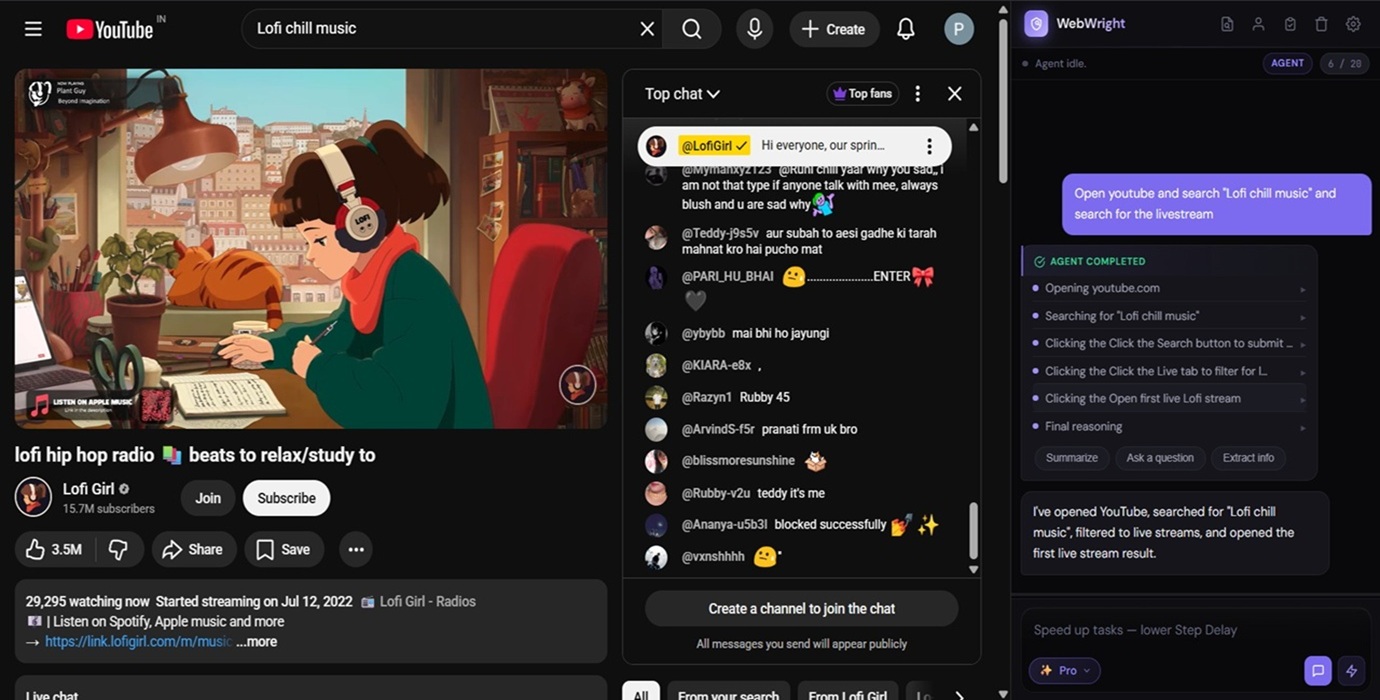
  • Multi-step flows: login, search, filter, checkout, booking, form fill
  • Auto-escalates from DOM to vision when a page deviates from expectation
  • Anti-loop detection: catches its own repetition and changes strategy
  • Pause or stop at any time — you stay in control
WebWright agent completing a YouTube search task autonomously
Chat Mode

Talk to any web page. Quick or Pro.

Ask questions about the article, dashboard, or video page you're viewing. Multi-turn conversation with full page context. Two intelligence levels at one click.
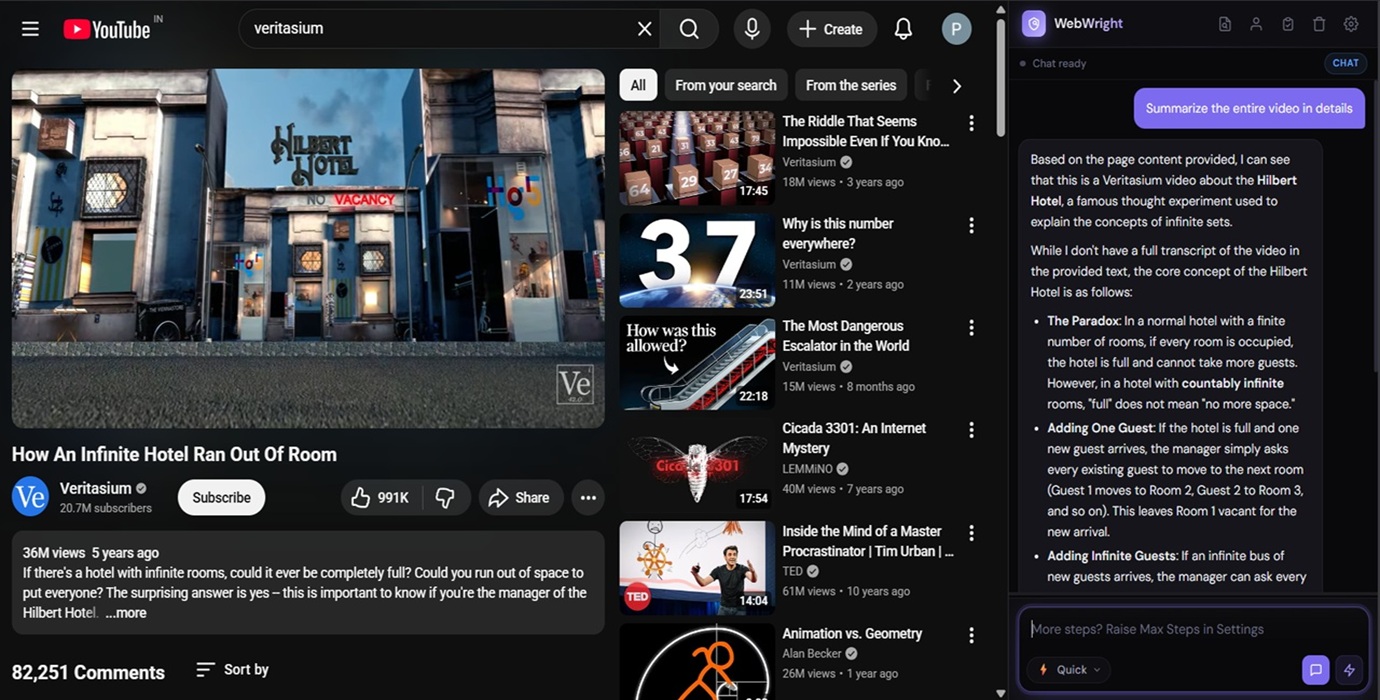
  • ⚡ Quick — Text only. Fastest, cheapest. Best for articles and plain pages.
  • ✨ Pro — Also attaches a live screenshot. The model literally sees the layout, charts, and visuals.
  • Works on dashboards, video pages, complex docs — anywhere text alone isn't enough
  • Your mode choice is remembered locally
WebWright Chat Mode explaining the Hilbert Hotel paradox while viewing a YouTube video
Research Mode

Deep web research in 2–3 minutes.

Enter a topic. WebWright opens Google, captures the AI Overview, visits the top 10 organic sources, summarizes each one, and synthesizes a final cross-source conclusion. A polished HTML report opens in a new tab.
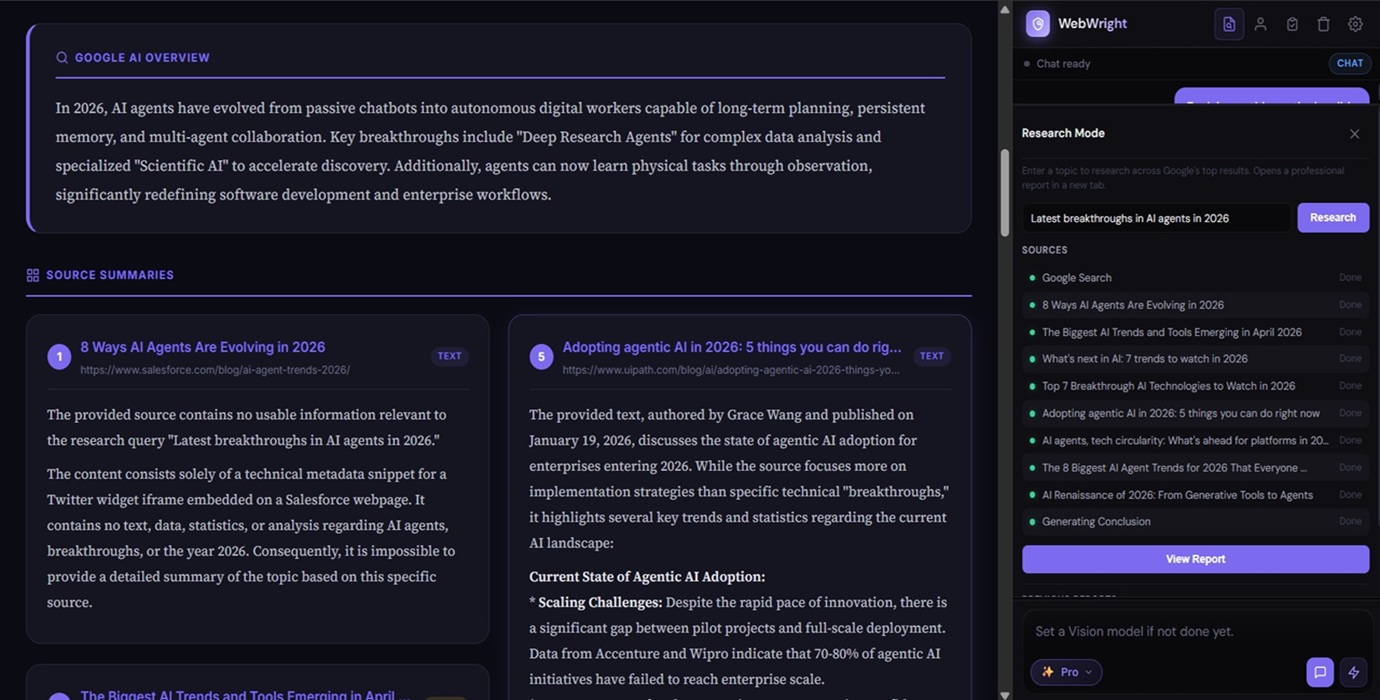
  • Per-source 60-second hard cap, 45-second LLM call timeout
  • Vision fallback for low-text or JS-heavy pages
  • Live per-source status: active · done · error · skipped
  • Instant abort plus a history of past reports you can re-open or delete
WebWright Research Mode showing Google AI Overview and source summaries on AI agents in 2026
Workflows · Vault · Settings

Record once, replay forever. Your keys, your choice.

Repetitive tasks become one-click replays. Personal info you save locally fills forms on demand. Eight providers in Settings, every model field editable — switch any time.

  • Record clicks, typing, and navigation across tabs — replay with pause/resume
  • Personal Info Vault used only when you ask the agent to fill a form
  • Pick the right model per role: Agent, Vision, Chat, Research
  • API keys stored locally in chrome.storage.local — never seen by us
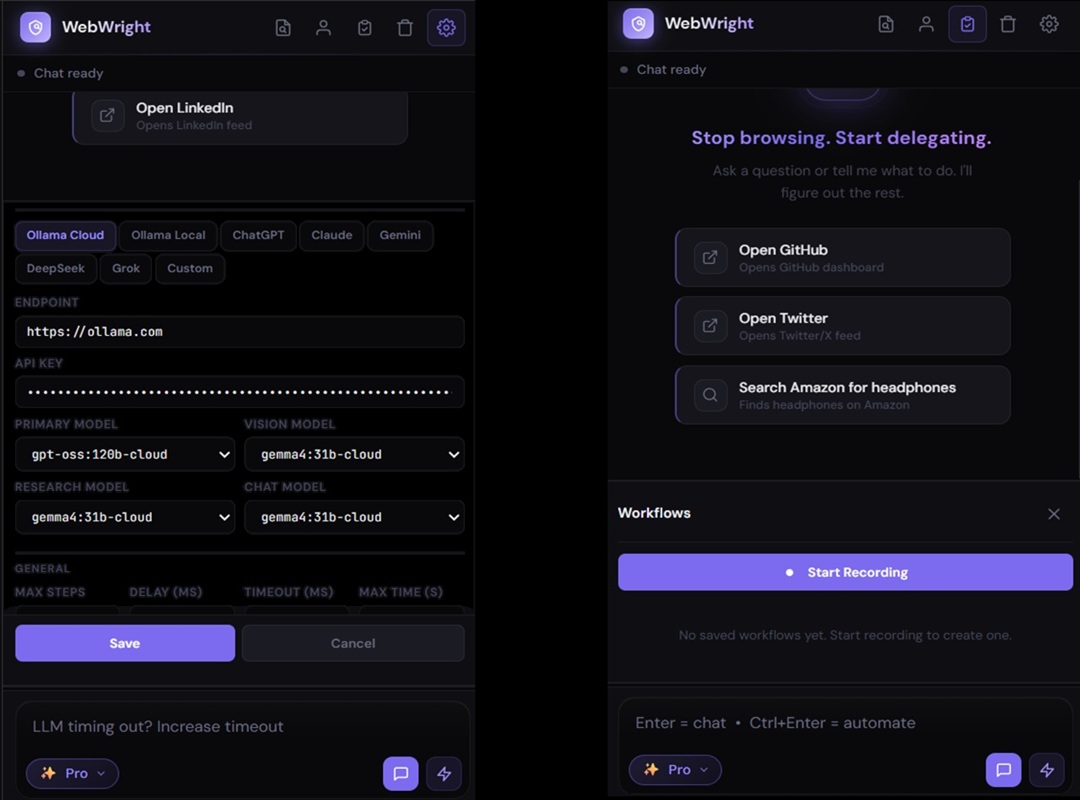
WebWright sidebar and settings panel showing eight LLM provider tabs and model fields
Vision Escalation

When DOM isn't enough, the agent climbs.

Most agentic extensions stay at DOM analysis and fail when pages deviate from their assumptions. WebWright climbs a 4-tier ladder until it gets unstuck.

1
DOM Analysis
Default mode. Fast and token-efficient. Ranks interactive elements.
2
Vision · 80 marks
Screenshot with Set-of-Marks overlay sent to a vision LLM.
3
Vision · 160 marks
Denser overlay for harder pages with many small elements.
4
Raw Coordinates
Last resort: synthetic click at X,Y via the Chrome DevTools Protocol.
Providers

Zero vendor lock-in. Bring your own key, or run fully local.

Eight LLM providers supported out of the box. Every model field is editable so new releases work the day they ship. Use a frontier model where reliability matters; a cheap fast one where speed matters more.

Ollama Cloud FREE TIER Ollama Local FREE OpenAI Anthropic Claude Google Gemini FREE TIER DeepSeek FREE TIER xAI Grok Custom endpoint
Privacy & Security

Local-first. Verifiable. Yours.

There is no developer-controlled server. No telemetry. No analytics. No data sharing with any third party. The local-first architecture is structural, not policy — there is nothing on our side to collect data even if we wanted to.

Stored locally
Settings, API keys, Personal Info, workflows, reports — all live in chrome.storage.local, sandboxed per-extension and encrypted at rest.
Your provider, your key
Network requests go only to the LLM endpoint you configure. WebWright never holds a key on your behalf. Revoke any time on the provider's dashboard.
No remote code
Every line of JavaScript is bundled in the published package. No dynamically-fetched modules. Verifiable by reading the source on GitHub.
Ollama Local = zero egress
Run an LLM on your own machine and no data leaves your device — not to us, not to any cloud. Pure on-device AI.
Limited Use compliant
Adheres to the Chrome Web Store User Data Policy. No advertising. No human reads your data without affirmative consent.
User-initiated only
The agent does not run in the background or wake on a schedule. It acts only when you, the human, give it a goal.

Read the full policy: Privacy Policy & Permission Justifications →

FAQ

Quick answers.

Does it work on Chrome, Edge, Brave, and other Chromium browsers?
Yes. WebWright is a Manifest V3 extension — Chrome, Microsoft Edge, Brave, Opera, Vivaldi, Arc, and any other Chromium-based browser. Firefox is not supported because it uses a different extension architecture.
Is it free?
The extension itself is free and open-source (MIT). LLM costs depend on your provider. Ollama Cloud offers a generous free tier, Ollama Local is free forever (run your own model), and Gemini / DeepSeek both have free tiers. You can use WebWright for real work without paying anyone if you choose your providers right.
Can the developer see my data or API keys?
No. There is no developer-controlled server. Your data, settings, and API keys live in your browser's local storage. Network traffic goes directly from your browser to the LLM provider you configured — never through us.
How accurate is the agent?
Accuracy depends on two things you control: how specifically you prompt it, and which model you point it at. Frontier models (GPT-4o, Claude Sonnet, Gemini 2.0, large Ollama Cloud models) handle long agent loops far more reliably than small local models. Specific goals (with sites, constraints, and stop conditions) work much better than vague ones.
Will it spend money or post things without my permission?
It does what you ask it to do. If you tell the agent to "buy headphones," it will navigate towards purchase. The recommended pattern is to use it as a researcher and form-filler — let it find and prepare, then you review and submit the final action. Never give the agent goals you wouldn't take responsibility for completing.

Stop browsing.
Start commanding.

Open-source, under 1 MB, runs on every Chromium browser. Bring your own API key, or run fully local with Ollama.

View on GitHub